

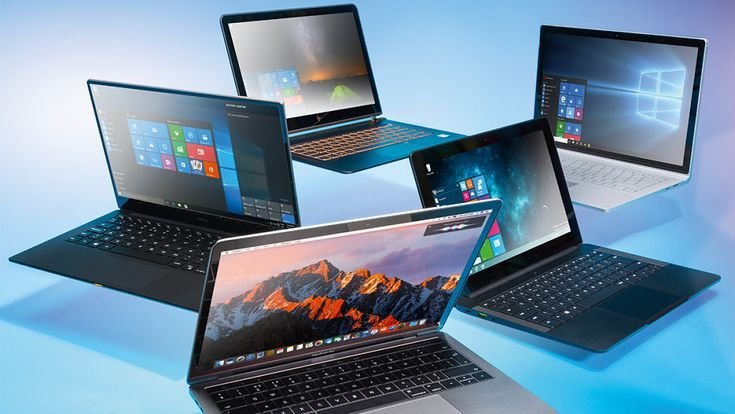
Choosing the right laptop is one of the most important decisions for any student. A dependable laptop supports online classes, research, assignments, presentations, programming, graphic design, and entertainment. Since students often use the same device for several years, selecting a laptop that balances performance, battery life, portability, and price is essential.
The market offers many options, from budget-friendly notebooks to premium ultrabooks. Some laptops focus on long battery life, while others are built for demanding tasks such as video editing or software development. Understanding your academic requirements before purchasing will help you avoid overspending and ensure your laptop remains useful throughout your studies.
A good student laptop should start quickly, handle multiple browser tabs without slowing down, run productivity software smoothly, and provide enough storage for documents, projects, and media files. Comfortable keyboards, quality displays, and reliable build quality also contribute to a better daily experience.
What Makes a Good Student Laptop?
Students use laptops for many purposes, including writing assignments, attending virtual classes, creating presentations, watching educational videos, browsing the internet, coding, and communicating with classmates. Because of these varied tasks, a student laptop should deliver balanced performance rather than focusing on one specific feature.
An ideal student laptop offers:
- Reliable performance
- Comfortable keyboard
- Lightweight design
- Long battery life
- Full HD display
- Fast SSD storage
- Modern connectivity
- Durable construction
- Good webcam and microphone
- Regular software support
These features provide a smooth experience without requiring a premium budget.
Important Features to Consider
The processor is the heart of any laptop. It determines how quickly programs open, how efficiently multiple applications run, and how responsive the overall system feels. Students who mainly use web browsers and office applications can comfortably work with Intel Core i5 or AMD Ryzen 5 processors, while engineering or computer science students may benefit from Intel Core i7 or AMD Ryzen 7 models.
Memory also plays a significant role. A laptop with 8GB of RAM is suitable for most students, while 16GB provides additional flexibility for multitasking, programming, or creative work. Storage should preferably be a solid-state drive (SSD), as SSDs load applications much faster than traditional hard drives. A capacity of 512GB provides enough space for assignments, software, photos, and videos.
Display quality affects comfort during long study sessions. A Full HD display with good brightness and accurate colors reduces eye strain and makes reading documents more enjoyable. Screen sizes between 13 and 15 inches offer a balance between portability and workspace.
Battery life is another essential consideration. Students frequently move between classrooms, libraries, and home, making long battery life extremely valuable. A laptop capable of lasting eight to twelve hours on a single charge reduces dependence on power outlets throughout the day.
Apple MacBook Air
The MacBook Air remains one of the most popular laptops for students due to its lightweight design, excellent battery life, and strong performance. Apple’s processors provide smooth multitasking while maintaining impressive energy efficiency.
Students studying writing, business, medicine, education, and many creative subjects appreciate the MacBook Air because of its quiet operation, premium display, and reliable software ecosystem. Its long software support also makes it a good long-term investment.
Advantages
- Excellent battery life
- Lightweight design
- High-quality display
- Fast SSD performance
- Premium build quality
- Quiet operation
Considerations
- Higher purchase price
- Limited upgrade options
- Fewer ports than some Windows laptops
Dell Inspiron Series
Dell Inspiron laptops provide dependable performance at competitive prices, making them popular among students. They are available in multiple screen sizes and hardware configurations, allowing buyers to choose a model that fits their budget.
Inspiron laptops typically include comfortable keyboards, modern processors, and good battery life, making them suitable for online learning, office work, and general productivity.
HP Pavilion Series
HP Pavilion laptops combine attractive designs with practical performance. They are well suited for students who need reliable everyday computing without purchasing a premium notebook.
Many Pavilion models feature Full HD displays, comfortable keyboards, and modern processors capable of handling research, presentations, spreadsheets, and video conferencing.
Lenovo IdeaPad Series
Lenovo has built a strong reputation for producing dependable laptops with excellent keyboards. The IdeaPad series is especially popular among students because it balances affordability and performance.
The keyboards are comfortable for long typing sessions, while modern processors and SSD storage provide smooth everyday performance.
ASUS VivoBook
ASUS VivoBook laptops appeal to students seeking modern designs, lightweight construction, and solid hardware at reasonable prices. Many models include fast charging, fingerprint readers, and high-quality displays.
They perform well for assignments, presentations, web browsing, media consumption, and light creative work.
Acer Aspire Series
The Acer Aspire series provides excellent value for students with limited budgets. These laptops often include capable processors, SSD storage, and Full HD displays while remaining competitively priced.
Aspire laptops are suitable for school assignments, online learning, office applications, and everyday productivity.
Microsoft Surface Laptop
Students who prioritize portability often choose Microsoft’s Surface Laptop lineup. These devices feature premium displays, comfortable keyboards, lightweight construction, and excellent battery life.
The clean Windows experience and responsive touchpad contribute to a productive working environment.
Choosing the Right Laptop for Your Field of Study
Different academic programs place different demands on hardware.
Business and education students usually require reliable office software, web browsing, and video conferencing, making mid-range laptops more than sufficient.
Engineering students often need additional processing power to run simulation software and technical applications. Computer science students benefit from extra RAM and faster processors for compiling code and running virtual machines.
Graphic design and multimedia students should prioritize displays with accurate colors and consider laptops equipped with dedicated graphics processors for editing images and videos.
Medical students generally require lightweight laptops with dependable battery life for accessing notes, online resources, and digital textbooks throughout the day.
Battery Life Matters
Battery performance directly affects productivity during classes and study sessions. Students frequently work away from charging outlets, making long battery life a major advantage.
Modern laptops commonly provide between eight and fifteen hours of battery life depending on hardware, screen brightness, and workload. Choosing an energy-efficient processor can significantly improve battery endurance.
Build Quality and Durability
Students often carry laptops between classrooms, libraries, and home. A durable chassis helps protect the internal components from daily wear.
Metal-bodied laptops generally feel more rigid, while quality plastic models offer good durability at lower prices. A protective sleeve or backpack provides additional protection during travel.
Connectivity
Modern student laptops should include essential connectivity options such as USB-C, USB-A, HDMI, Wi-Fi 6, Bluetooth, and a headphone jack. These ports support projectors, external displays, storage devices, printers, and other accessories commonly used in educational environments.
Common Buying Mistakes
Many students purchase laptops with specifications that do not match their actual needs. Buying an expensive gaming laptop for simple document editing increases cost without providing meaningful benefits. Others choose the lowest-priced model only to discover limited storage, poor battery life, or slow performance after several months.
Ignoring warranty coverage, repair options, and software support can also lead to higher long-term costs. Comparing several models before purchasing usually results in a better decision.
Recommended Specifications
For most students, the following specifications provide an excellent balance of performance and value:
- Intel Core i5 or AMD Ryzen 5 processor
- 8GB or 16GB RAM
- 512GB SSD
- Full HD display
- Battery life of at least eight hours
- Wi-Fi 6 support
- Windows 11 or the latest version of macOS
These specifications comfortably handle research, online learning, productivity software, programming, and multimedia tasks.
Frequently Asked Questions
What is the best laptop for college students?
The best laptop depends on your course requirements, but models such as the Apple MacBook Air, Dell Inspiron, Lenovo IdeaPad, HP Pavilion, and ASUS VivoBook offer excellent value for most students.
How much RAM do students need?
Most students can comfortably use 8GB of RAM, while 16GB is recommended for programming, design, engineering, and heavy multitasking.
Is SSD storage better than a hard drive?
Yes. SSDs provide significantly faster boot times, quicker application loading, improved responsiveness, and greater durability than traditional hard drives.
Should students buy a gaming laptop?
Only students who regularly play games or use demanding software such as 3D rendering or video editing applications generally benefit from gaming laptops.
Which screen size is best?
A 13- to 15-inch display provides an ideal balance between portability and workspace for most students.
How long should a student laptop last?
A quality laptop with modern specifications can typically remain reliable for five to seven years with proper maintenance and software updates.
Conclusion
The best student laptop is one that matches your academic requirements, budget, and daily workload. Reliable performance, sufficient memory, SSD storage, long battery life, and a comfortable keyboard contribute far more to productivity than unnecessary premium features.
Whether you choose the Apple MacBook Air, Dell Inspiron, Lenovo IdeaPad, HP Pavilion, ASUS VivoBook, Acer Aspire, or Microsoft Surface Laptop, focus on finding a device that delivers consistent performance and dependable reliability throughout your education. A carefully chosen laptop will support your studies, simplify daily tasks, and remain useful long after graduation.





Leave a Reply